lock TESLA MODEL S 2018 User Guide
[x] Cancel search | Manufacturer: TESLA, Model Year: 2018, Model line: MODEL S, Model: TESLA MODEL S 2018Pages: 195, PDF Size: 5.51 MB
Page 54 of 195
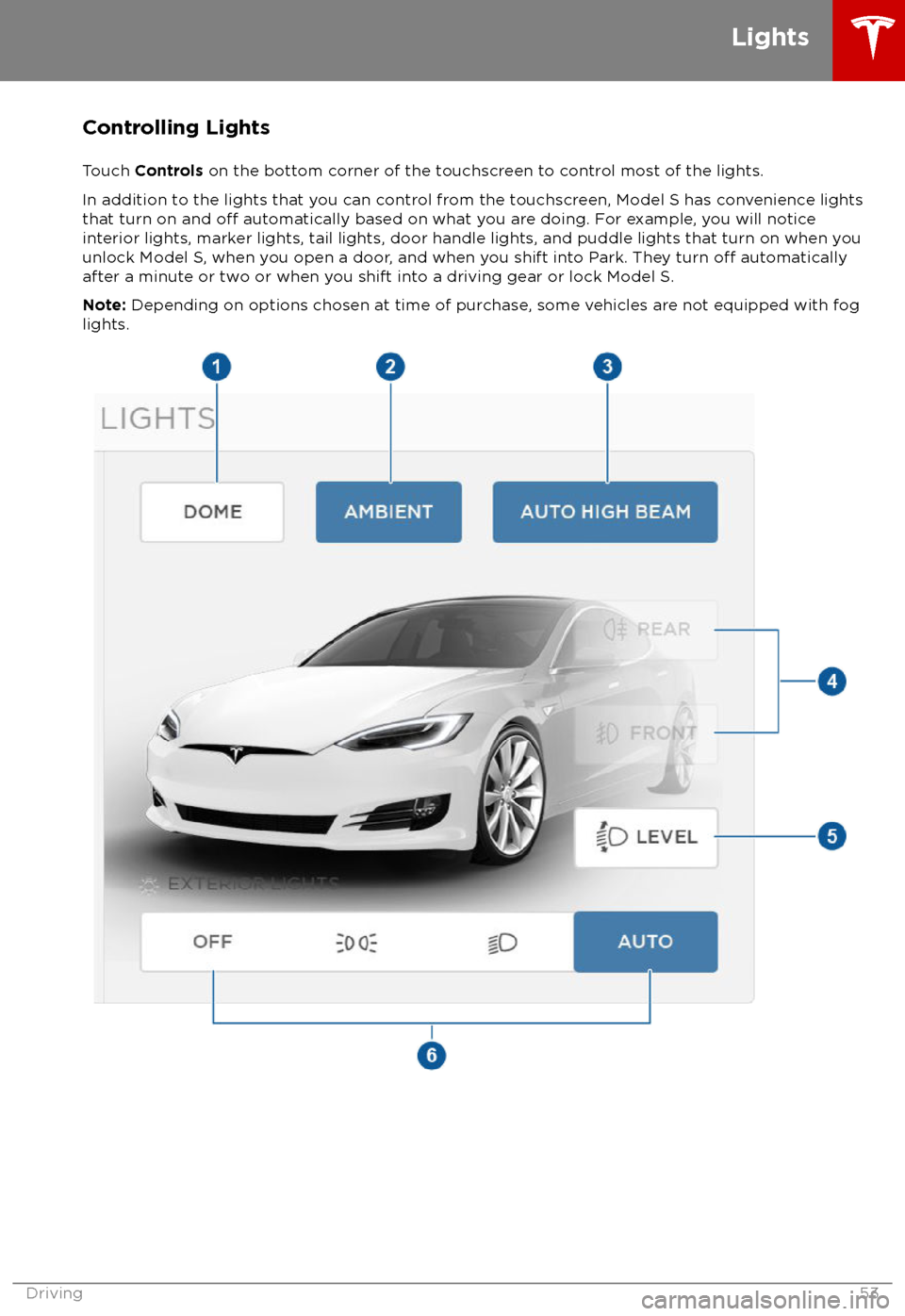
Controlling Lights
Touch Controls on the bottom corner of the touchscreen to control most of the lights.
In addition to the lights that you can control from the touchscreen, Model S has convenience lights that turn on and
off automatically based on what you are doing. For example, you will notice
interior lights, marker lights, tail lights, door handle lights, and puddle lights that turn on when you
unlock Model S, when you open a door, and when you shift into Park. They turn
off automatically
after a minute or two or when you shift into a driving gear or lock Model S.
Note: Depending on options chosen at time of purchase, some vehicles are not equipped with fog
lights.
Lights
Driving53
Page 55 of 195
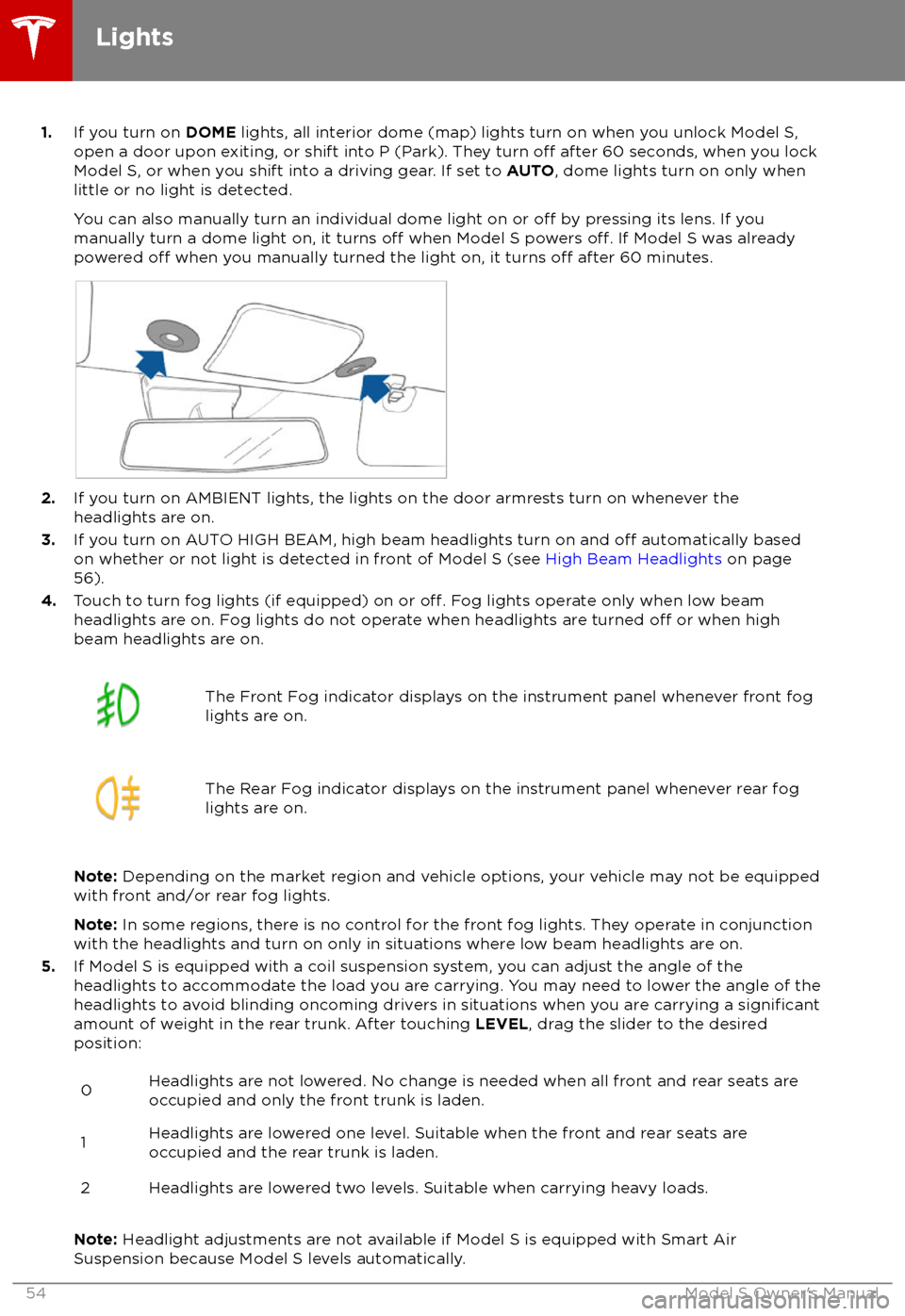
1.If you turn on DOME lights, all interior dome (map) lights turn on when you unlock Model S,
open a door upon exiting, or shift into P (Park). They turn off after 60 seconds, when you lock
Model S, or when you shift into a driving gear. If set to AUTO, dome lights turn on only when
little or no light is detected.
You can also manually turn an individual dome light on or
off by pressing its lens. If you
manually turn a dome light on, it turns off when Model S powers off. If Model S was already
powered off when you manually turned the light on, it turns off after 60 minutes.
2. If you turn on AMBIENT lights, the lights on the door armrests turn on whenever the
headlights are on.
3. If you turn on AUTO HIGH BEAM, high beam headlights turn on and
off automatically based
on whether or not light is detected in front of Model S (see High Beam Headlights on page
56).
4. Touch to turn fog lights (if equipped) on or
off. Fog lights operate only when low beam
headlights are on. Fog lights do not operate when headlights are turned off or when high
beam headlights are on.
The Front Fog indicator displays on the instrument panel whenever front fog
lights are on.The Rear Fog indicator displays on the instrument panel whenever rear fog
lights are on.
Note: Depending on the market region and vehicle options, your vehicle may not be equipped
with front and/or rear fog lights.
Note: In some regions, there is no control for the front fog lights. They operate in conjunction
with the headlights and turn on only in situations where low beam headlights are on.
5. If Model S is equipped with a coil suspension system, you can adjust the angle of the
headlights to accommodate the load you are carrying. You may need to lower the angle of theheadlights to avoid blinding oncoming drivers in situations when you are carrying a
significantamount of weight in the rear trunk. After touching LEVEL, drag the slider to the desired
position:
0Headlights are not lowered. No change is needed when all front and rear seats are
occupied and only the front trunk is laden.1Headlights are lowered one level. Suitable when the front and rear seats are occupied and the rear trunk is laden.2Headlights are lowered two levels. Suitable when carrying heavy loads.
Note: Headlight adjustments are not available if Model S is equipped with Smart Air
Suspension because Model S levels automatically.
Lights
54Model S Owner
Page 61 of 195
Braking SystemsWarning: Properly functioning braking
systems are critical to ensure safety. If you experience a problem with the brake
pedal, brake caliper, or any component of
a Model S braking system, contact Tesla
immediately.
Model S has an anti-lock braking system
(ABS) that prevents the wheels from locking
when you apply maximum brake pressure. This
improves steering control during heavy
braking in most road conditions.
During emergency braking conditions, the
ABS constantly monitors the speed of each
wheel and varies the brake pressure according
to the grip available.
The alteration of brake pressure can be felt as
a pulsing sensation through the brake pedal.
This demonstrates that the ABS is operating
and is not a cause for concern. Keep
firm and
steady pressure on the brake pedal while
experiencing the pulsing.
The ABS indicator flashes briefly on
the instrument panel when you firststart Model S. If this indicator lights
up at any other time, an ABS fault
has occurred and the ABS is not
operating. Contact Tesla. The braking
system remains fully operational and
is not
affected by an ABS failure.
However, braking distances may
increase.
If the instrument panel displays this
indicator at any time other than
displaying
briefly when you first start
Model S, a brake system fault is
detected or the brake
fluid level is
low. Contact Tesla immediately.
Emergency Braking
In an emergency, fully press the brake pedal and maintain
firm pressure, even on low
traction surfaces. The ABS varies the braking
pressure to each wheel according to the
amount of traction available. This prevents
wheels from locking and ensures that you stop
as safely as possible.
Warning: Do not pump the brake pedal.
Doing so interrupts operation of the ABS
and can increase braking distance.Warning: Always maintain a safe distance
from the vehicle in front of you and beaware of hazardous driving conditions.
While the ABS can improve stopping
distance, it cannot overcome the laws of physics. It also does not prevent the
danger of hydroplaning (where a layer of
water prevents direct contact between the tires and the road).
Automatic Emergency Braking automatically
applies full braking in situations where a
collision is considered imminent (see Automatic Emergency Braking on page 94).
Warning: Automatic Emergency Braking
is not designed to prevent a collision. At best, it can minimize the impact of a
frontal collision by attempting to reduce
your driving speed. Depending on Automatic Emergency Braking to avoid a
collision can result in serious injury or death.
Brake Wear
Model S brake pads are equipped with wear
indicators. A wear indicator is a thin metal
strip attached to the brake pad that squeals as
it rubs against the rotor when the pad wears
down. This squealing sound indicates that the
brake pads have reached the end of their service life and require replacement. To
replace the brake pads, contact Tesla Service.
Brakes must be periodically inspected visually by removing the tire and wheel. For detailed
specifications and service limits for rotors and
brake pads, see Brakes on page 170.
Warning:
Neglecting to replace worn
brake pads damages the braking system
and can result in a braking hazard.
Regenerative Braking
Whenever Model S is moving and your foot is
off the accelerator, regenerative braking slows
down Model S and feeds any surplus energy
back to the Battery.
By anticipating your stops and reducing or
removing pressure from the accelerator pedal
to slow down, you can take advantage of regenerative braking to increase driving range.
Of course, this is no substitute for regular
braking when needed for safety.
Note: If regenerative braking is aggressively
slowing Model S (such as when your foot is
completely
off the accelerator pedal at
highway speeds), the brake lights turn on to
alert others that you are slowing down.
Brakes
60Model S Owner
Page 102 of 195

1.Status bar
The top line displays provides shortcuts to lock/unlock Model S, to access HomeLink (if equipped) and Driver
Profiles, display vehicle information (the Tesla “T”), download software
updates, display network strength and Bluetooth
Page 128 of 195

Touch the zoom icons in the top right area to
zoom the map in and out on your current or
chosen location. Touch the North/Heading Up icon to center the map on your current
location and change the orientation of the
map:North Up - North is always at the
top of the screen.Heading Up - The direction you are
heading is always at the top of the
screen. The map rotates when you
change direction. This icon has an
integrated compass that indicates
the direction you are driving.
You can rotate the map in any direction using
your fingers. When you rotate the map in a
clockwise or counter-clockwise direction, or
move the map up, down, left, or right, the
North/Heading Up icon turns gray and no
longer tracks your position. (The message
"Tracking Disabled" is displayed next to the North/Heading Up icon.) To re-enable
tracking, and adjust the orientation of the map
so that North, or the direction you are
traveling, is at the top of the screen, touch the
North/Heading Up icon again. The North/
Heading Up icon is reenabled, and the
message, "North Up" or "Heading Up" is
displayed.
Note: To keep tracking enabled, zoom in or
out using only the zoom icons or by pinching
your
fingers. To disable tracking, move the
map in any direction.
To maximize the size of the map, the
touchscreen
Page 133 of 195

About the Security SystemIf Model S does not detect a key nearby and a
locked door or trunk is opened, an alarm sounds and the headlights and turn signals
flash. To deactivate the alarm, press any
button on the key.
To manually enable or disable the alarm
system, touch Controls > Settings > Safety &
Security > Alarm . When set to ON, Model S
activates its alarm one minute after you exit,
the doors lock, and a recognized key is no
longer detected.
If your Model S is equipped with the optional security package, it includes a battery-backed
siren that sounds in situations where a locked door or trunk is opened and Model S does notdetect a key nearby. If the Tilt/Intrusion
setting is on, the siren also sounds if Model S
detects motion inside the cabin or if the
vehicle is moved or tilted (for example, with a
tow truck or jack). To temporarily turn the Tilt/
Intrusion detection system
off, touch
Controls > Settings > Safety & Security > Tilt/
Intrusion > OFF . The Tilt/Intrusion setting is
enabled every time Model S is unlocked.
Note: If you plan to leave something that
moves, such as a dog, inside your locked
Model S, remember to turn
off Tilt/Intrusion .
Motion detected inside Model S activates the
siren.
Note: The Alarm must be on to enable Tilt/
Intrusion .
Security Settings
132Model S Owner
Page 137 of 195

Loading New Software
Model S updates its software wirelessly,
providing new features throughout your term of ownership. Tesla recommends that you
install software updates as soon as they are
available. The
first time you enter Model S
after an update is made available, a scheduling window displays on the touchscreen. The
scheduling window displays again at the end
of your
first driving session.
Note: Some software updates can take up to
three hours to complete. Model S must be in
Park while the new software is being installed.
To ensure the fastest and most reliable
delivery of software updates, leave the Wi-Fi
turned on and connected whenever possible
(see Connecting to Wi-Fi on page 135).
When a software update is available, a yellow
clock icon appears on the touchscreen
Page 143 of 195
Opening the Charge Port
The charge port is located on the left side of
Model S, behind a door that is part of the rear
tail light assembly. Park so that the charge
cable easily reaches the charge port.
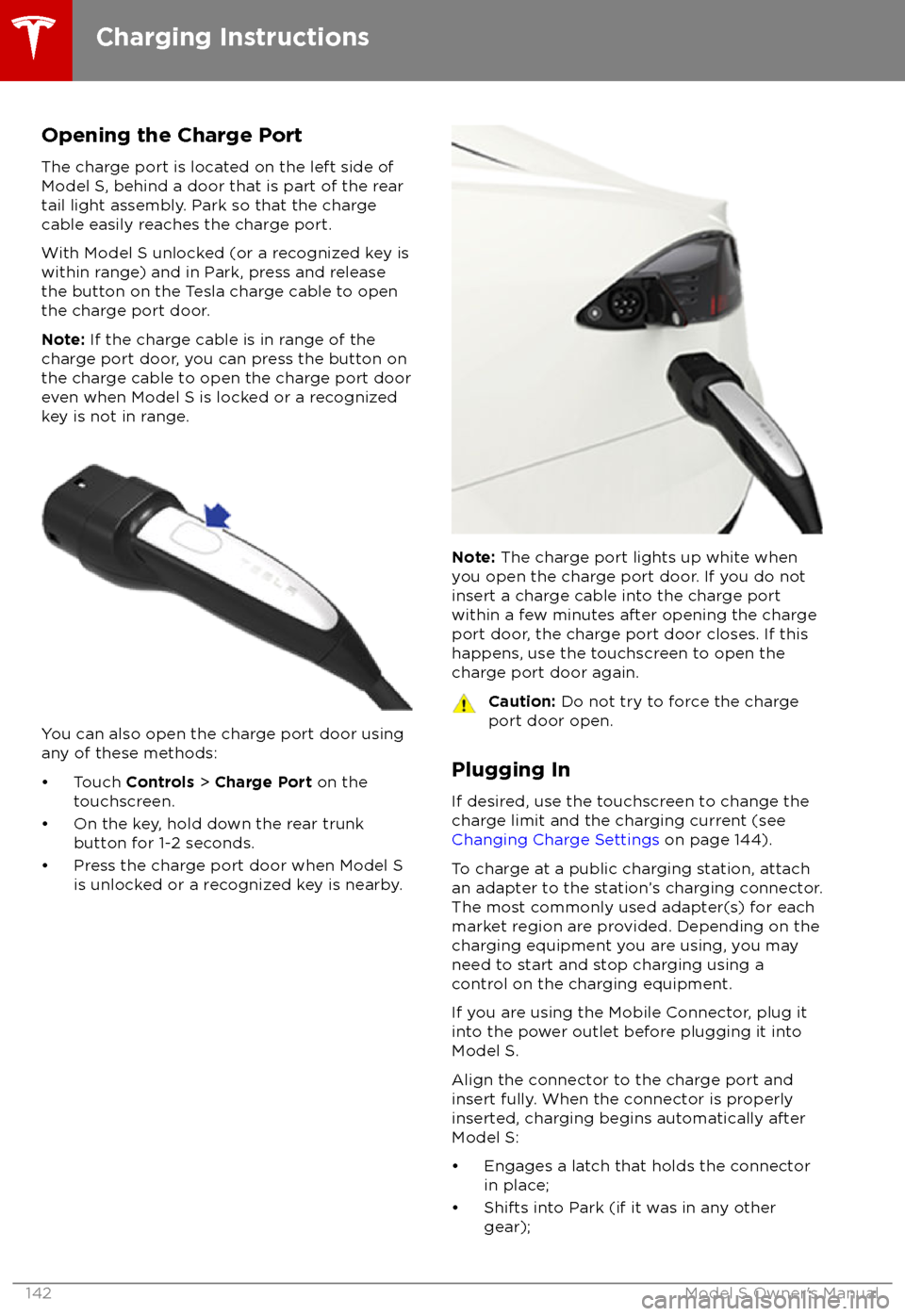
With Model S unlocked (or a recognized key is
within range) and in Park, press and release
the button on the Tesla charge cable to open the charge port door.
Note: If the charge cable is in range of the
charge port door, you can press the button on the charge cable to open the charge port door
even when Model S is locked or a recognized
key is not in range.
You can also open the charge port door using
any of these methods:
Page 158 of 195
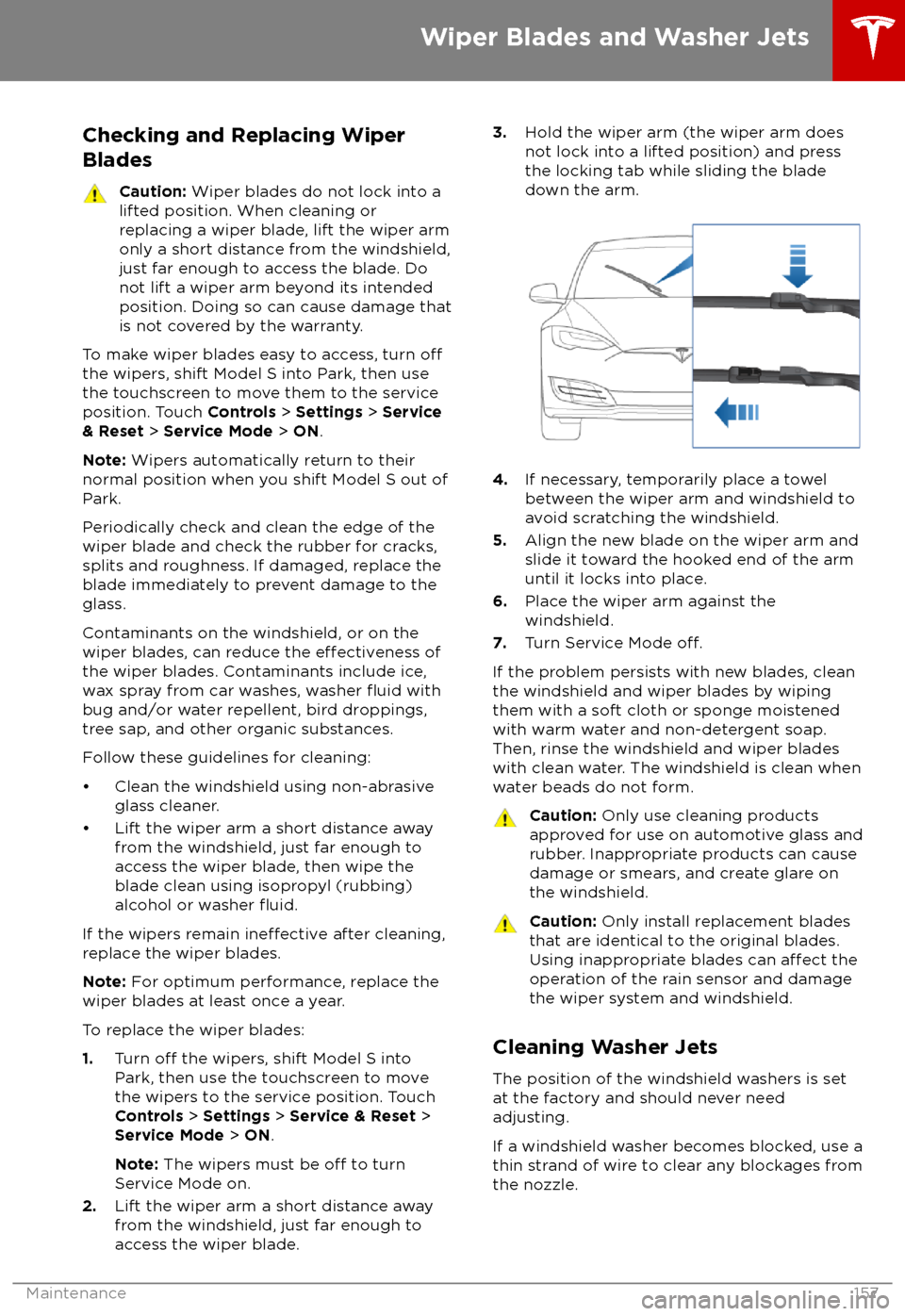
Checking and Replacing WiperBladesCaution: Wiper blades do not lock into a
lifted position. When cleaning or
replacing a wiper blade, lift the wiper arm
only a short distance from the windshield,
just far enough to access the blade. Do
not lift a wiper arm beyond its intended
position. Doing so can cause damage that
is not covered by the warranty.
To make wiper blades easy to access, turn offthe wipers, shift Model S into Park, then use
the touchscreen to move them to the service
position. Touch Controls > Settings > Service
& Reset > Service Mode > ON .
Note: Wipers automatically return to their
normal position when you shift Model S out of Park.
Periodically check and clean the edge of the wiper blade and check the rubber for cracks,
splits and roughness. If damaged, replace the blade immediately to prevent damage to the
glass.
Contaminants on the windshield, or on the wiper blades, can reduce the
effectiveness of
the wiper blades. Contaminants include ice,
wax spray from car washes, washer
fluid with
bug and/or water repellent, bird droppings,
tree sap, and other organic substances.
Follow these guidelines for cleaning:
Page 170 of 195

MotorTypeAC induction motor, liquid-cooled, with
variable frequency driveNominal Voltage320 VoltsMaximum speed of large motors:
- rear motor on all single motor vehicles
- rear motor on Performance dual-motor vehicles16,000 rpmMaximum speed of small motors:
- front motor on all dual-motor vehicles
- rear motor on non-Performance dual-motor vehicles18,000 rpmMaximum net power* and motor speed of largemotorsBase: 285 kW @ 6,850 rpm
Performance: 375 kW @ 5,900 rpmMaximum net power* and motor speed of small
motors193 kW @ 6100 rpmMaximum torque of large motorsBase: 440 Nm
Performance: 650 NmMaximum torque of small motors330 Nm*Tested in accordance with ECE R85
Transmission
TypeSingle speed fixed gearOverall Final Drive RatioSmall motor: 9.325:1
Large motor: 9.734:1Reverse GearReverse direction of motor, limited to
24 km/h
Steering
TypeRack and pinion with electronic power
steering, speed sensitiveNumber of turns lock to lock2.05Turning Circle (curb to curb)11.3 meters
Subsystems
Specifications169